Showing posts with label Tim Grey. Show all posts

Monday, May 19, 2014

Marsh Wrens and More at Great Meadows

Marsh Wren singing in the early morning light
After reading an article in Tim Grey's Pixology Number 022 titled "A "Refine Photos" Workflow", I decided to try the methodology in reviewing the pictures that I obtained yesterday at Great Meadows National Wildlife Refuge during a Meet Up sponsored by Mike Milica.  I had taken about 500 photos and after downloading them into Lightroom, first I went through and deleted all the out of focus and empty frame photos.  Then, by utilizing the command Refine Photos and following the steps that Tim Grey outlines made picking the photos for this blog extremely easy.  Pixology is published monthly and has many good articles on Lightroom and Photoshop.  You can find more information at www.timgrey.com.

Originally, the meet up was supposed to be on Saturday, but was postponed to Sunday, because of the heavy rains.  I was not going to attend the Saturday session because of bird-a-thon (which I am afraid I did not attend because of getting over a cold and the heavy rain in the morning).  With Sunday morning, being very pleasant.  I joined the group at Great Meadows at 5:15 AM, so we could be out on the dike path for sunrise.

The main subject was to be the marsh wrens, and again, the red-winged blackbirds.  Of course, if any other interesting subjects showed up, I wouldn't hesitate to take photos of them.

The first subject was a pair of Canada geese who were watching over their goslings.  One of the goslings was very aggressive and attacking other goslings.

Gosling standing by an adult

Canada geese goslings fighting
The marsh wrens were singing and also gathering material from the cattails to line the nests that they were building.  Marsh Wren males build a number of nests and then the female comes and chooses which one she likes.  In order to take photos of the marsh wrens required patience , since the wrens  would pop up and then go right back down into the deep marsh grass.  They usually would come up around same area so you just had to pick a spot and then adjust position as needed.

Marsh Wren with cattail material

Marsh Wren singing

Marsh Wren doing the split
Again, the red-winged blackbirds were out singing and the interesting part was that they had favorite perches to which they flew in rotation.  This made it easier to get photographs of the red-wing blackbirds.
Red-winged Blackbird singing in the early morning light

Female red-winged blackbird flying

Red-winged blackbird singing on a cattail

Red-wing blackbird flying

I've photographed from around 5:30 AM to 9 AM, came home and downloaded the pictures, selected the ones I wanted for today's blog and then went to sleep for a while.  Later in the day, I post processed the pictures.


Topaz Clean, which will be 50% off from May 8 - May 31 with coupon code "mayclean".

Topaz Clean lets you smooth edges and surfaces in your photos. It's great for subjects like cars and portraits, and you can also use it to create some interesting effects as well. Clean has three main controls:
* Smoothness: smooths the surfaces of your photo. Useful for removing blemishes from skin, removing dust + noise, creating a "flatter" texture, and more.
* Edges: smoothly enhances edges with a unique process that looks "vectorized". This creates smooth and well-defined lines in your photo that work great on image features like hair and eyelashes.
* Texture: recovers and refines original detail in your image to keep it looking natural. For example, re-introduce original skin texture in your portraits to prevent your post-processing from looking too overdone or "plastic".
You can see some examples on the product page: http://www.topazlabs.com/clean
Topaz Clean is a great value: it's originally $29.99 but we're dropping it to just $14.99 for this promotion.
http://www.topazlabs.com/aff/idevaffiliate.php?id=850&url=http://www.topazlabs.com/clean


Tuesday, March 4, 2014

Keywording Is Important on Import

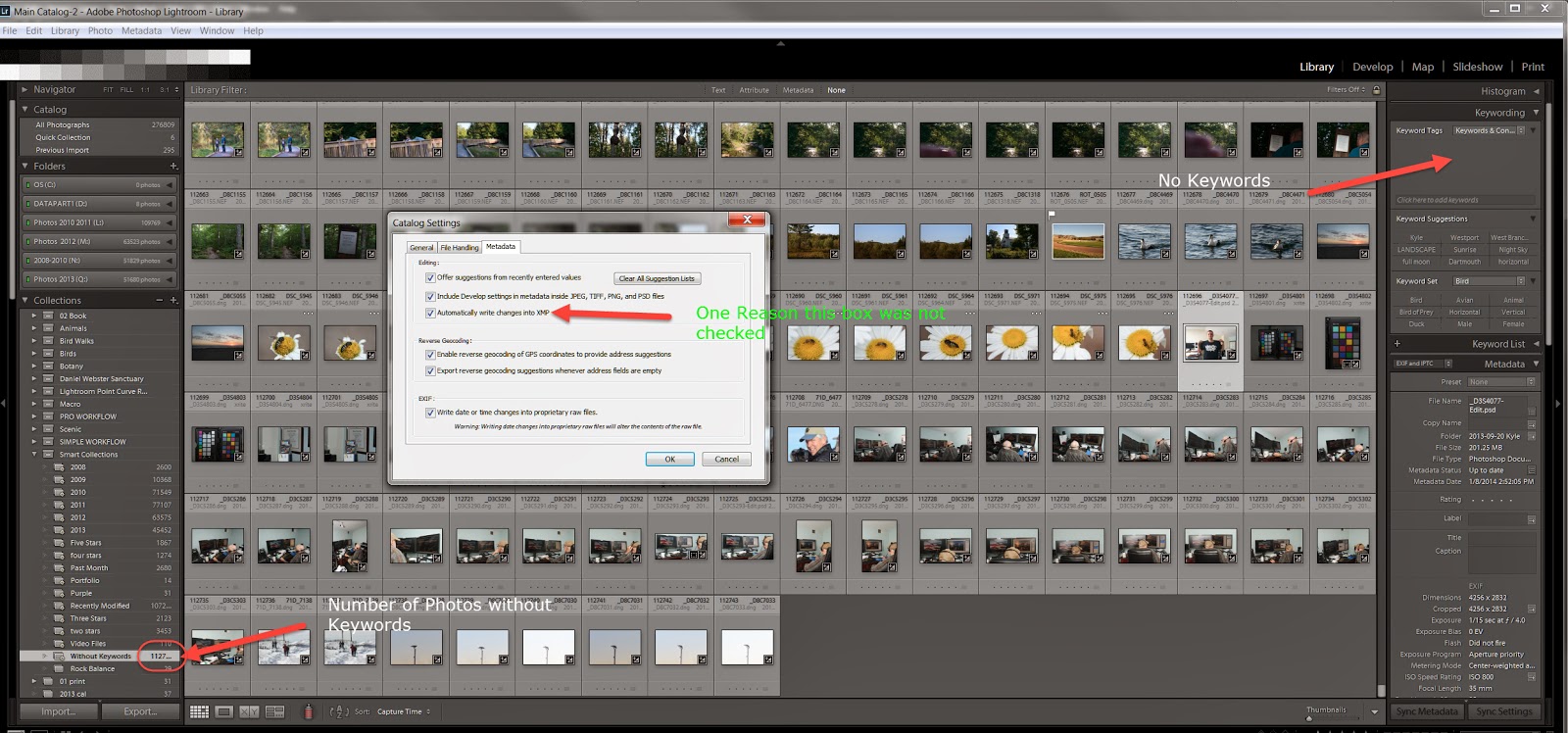
In a follow-up to the blog on creating hierarchical sets in keywords in Lightroom to make it easier to add keywords to a set of photographs, I noticed that a number of photographs were not showing up for a number of my locations. I ended up searching in the smart catalog for those pictures that did not have any keywords. I found that approximately 1/3 of all my pictures did not have keywords. There were variable reasons why this happened. First when I got a new computer and then created a new catalog I had not check the box to automatically write XMP data into the picture. Therefore I lost a great number of keywords. Secondly early in my career, I did not keyword every picture, which I do now. Also I kept every picture even though it was out of focus all was not worthwhile keeping. Now I have also the pleasure of going through all those pictures, keywording and deleting the out of focus or bad pictures. It would have been easy to do it originally, but now I have something to keep me busy in my spare time.

I just went through all of the pictures without keywords and found a good number that were already starred. Oh well, in my spare time a lot more to do.

The interesting thing that just happened is that Tim Grey in his latest issue of Pixology talked about going back and fixing metadata in old pictures. I thought that great minds work in the same direction and wrote him an email saying that.

My advice if you are using Lightroom or whatever database you utilize is to keyword all of the pictures during or right after you import them. This way you can find whatever photo you need.

Doing this proactively is better than going back and spending an enormous amount the time doing what you should of done in the first place.