Showing posts with label Fog. Show all posts

Monday, August 31, 2015

Morning Sunrise at Gooseberry

Finally, a morning when we did not have to pick up my son at work.  We will be able to get a sunrise today.  Arriving at Gooseberry neck, Westport, Massachusetts at around 5:20 AM.  The sky was still dark in the waxing gibbous moon was high in the West.  The first pictures that I took were of the waxing gibbous moon.
Waxing Gibbous Moon
 Then turning our attention to the East, looking over Buzzards Bay toward the Cape, the sky was filled with clouds haze and fog to the right.  I utilized my Nikon D 810, Tamron 28-75 on a tripod.  I set my ISO at 200, F-stop at f10, put a two second delay on shutter release and used a wired remote..  Checking a depth of field chart everything was in focus from about 5 feet to infinity.  I then took a series of photographs starting at about 5:35 AM, with Venus still prominent in the sky, and finishing up after the sun had risen.  Timewise halfway before the sun rose.  I created a panorama to show the fog bank, haze and clouds over Buzzards Bay.  The haze and clouds created a bright red sun, rather than a bright yellow sun, as it rose from beneath the horizon.

Nautical Dawn with Venus in the Sky
Civil Dawn
Civil Dawn
Civil Dawn
Panorama Show in the Clouds Haze and the Fog Bank on the Right
Just Prior to Sunrise
Sun Rising
Final Photograph after the Sun Had Risen
I have photographed it both sunrises and sunsets on Gooseberry neck over the years and never or to the same.  For sunrises, you should arrive while it is still dark, and for sunsets be prepared to stay at least a half hour after sunset because you never know when the best colors is going to occur.

Because of the dampness in the ear and the slight fog, prior to putting equipment the way we dried off the tripod legs with the towel and blotted the camera and lens to remove any dampness that may have been on them.

Using the coupon code mborn you will receive a 15% discount on any or all of the Topaz plug-ins.


Help Support my blog by purchasing from Amazon. Clicking on this link and utilizing the link does not cost you anything.
BUY FROM AMAZON

Thursday, August 27, 2015

Weather Changes

Sanderling
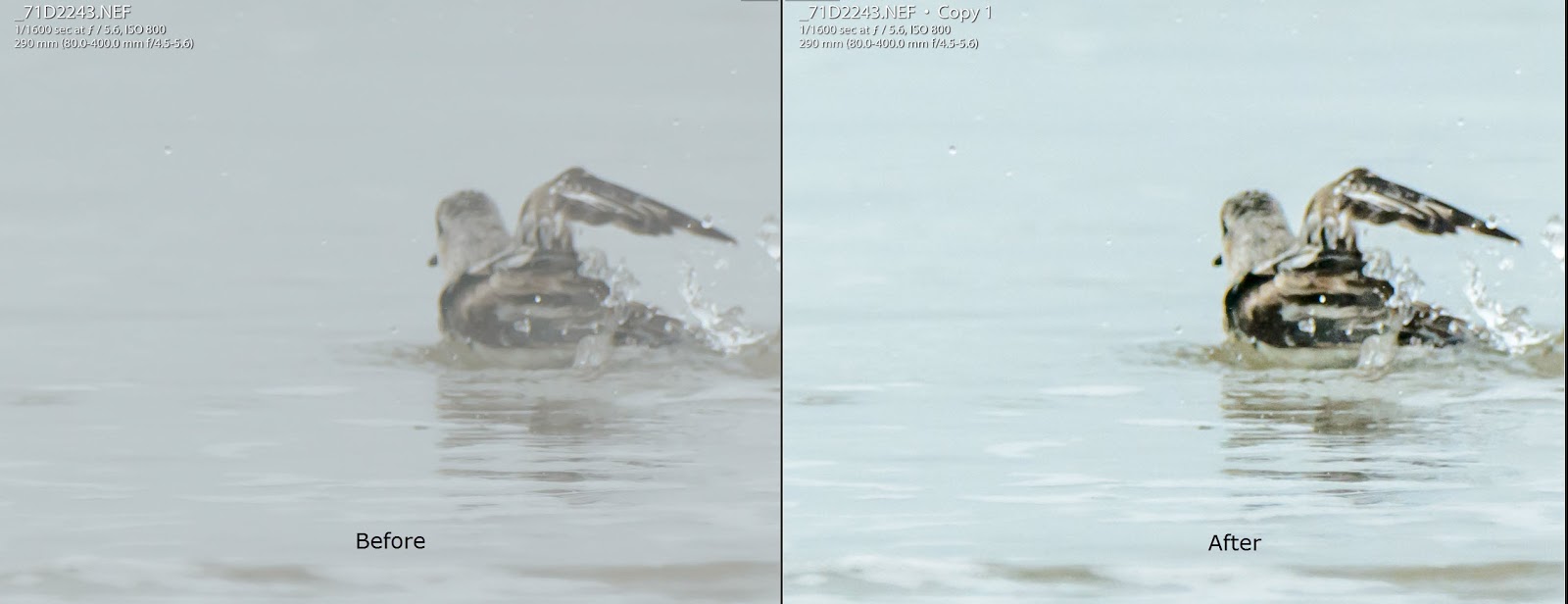
Left the house yesterday morning to travel out to Horseneck Beach and Gooseberry, at which time the sun was shining.  Arriving out at Horseneck, it was partly overcast, in the distance haze could be seen.  Walking down to the beach, we observed goals and shorebirds running all over the place.  There were small waves coming in and the tide was outgoing.  We picked an area close to the waters edge and sat down and waited for the birds to come to us, rather than trying to chase them.  After a period of time we did move laterally on the beach and and picked a new area to photograph.  As we were sitting there fog started to roll in and was decreasing visibility to at one point we were less than a 10th of a mile visibility and looking across the water.  We could not even see Gooseberry Neck.  The birds.  However did not pay any attention to the fog and kept moving up and down the beach, feeding and at times, chasing one another trying to maintain their own territory.  Normally, sanderlings follow the tide coming in and out running away as its incoming and following it out as it is outgoing.  However, when one of the shorebirds decide to take a bath.  They do not seem to care about the waves, and I am more interested in cleaning themselves..  Gulls flying through the fog give you a mystical appearance like that of a ghost, white on white.

Sanderling Chase Mode
Sanderling Feeding
Sanderling Bathing
Sanderling Bathing Partly on the Water
Herring Gull in the Fog White on White
Sanderling, Looking for Food
Sanderling Bathing, before Is in the Fog and after Is from Post Processing

As the fog grew thicker, we decided to travel over to Gooseberry to observe how everything looked from that vantage point.  By the time we got to Gooseberry, the fog had completely dissipated.  And we had bright sun shining.  On one of the seaweed covered rocks that was completely exposed due to the low tide was a few ducks.  The one I wanted a photograph of was a male American Scoter (Black Scoter).  The other ducks were young eiders.  We slowly moved down to the waters edge, the eiders left the rock and swam away, but the American Scoter continue to lay on the rock and just observe us.  The orange on its beak glowed in the sun.  After changing positions to get different views of the scoter, I turned to move again and hit a wet, slippery rock and fell backwards, happily keeping my camera and lens up so it did not hit the rock, or ground.  I did get a skinned elbow.  Handing my camera to my companion, and then fell completely over got up and since I really was not injured and I did not injured my camera set.  Oh well, took some more pictures and then went to the car to brush all the sand off of me.

American (Black) Scoter
My lens hood protected the front element of my lens from getting damaged and also because of the fog.  I treated my lens with fog eliminator which is distributed by Nikon.  It helps keep condensation from forming on the lens. It is not expensive and avaiable from Amazon http://amzn.to/1Ik0enV


Remember ReMask 5 will be on sale ($20 off) from August 25th – September 18th.  The coupon code "GetReMask5" use can take advantage of the discounted price of $49.99 (regularly $69.99).

You can link directly to the ReMask product page with this URL: http://www.topazlabs.com/aff/idevaffiliate.php?id=850&url=http://www.topazlabs.com/remask


Using the coupon code mborn you will receive a 15% discount on any or all of the Topaz plug-ins.


Help Support my blog by purchasing from Amazon. Clicking on this link and utilizing the link does not cost you anything.
BUY FROM AMAZON

Thursday, June 18, 2015

Lightroom CC 2015 Dehaze Slider


Sun Setting in the Fog
One of the new additions to Lightroom in the CC 2015 version is the DEHAZE SLIDER.  Here is what Julianne Kost wrote about this control "The new Dehaze control in Lightroom CC and Adobe Camera Raw 9.1 can help you to dramatically improve an image by removing haze. The Dehaze technology is based on a physical model of how light is transmitted, and it tries to estimate light that is lost due to absorption and scattering through the atmosphere. For the best results, you’ll want to set the white balance for the image before using Dehaze. Then, in the Effects panel, move the slider to the right – to easily remove the haze from the original scene. Move the slider to the left to add a creative haze effect.You can choose to make very subtle to very significant adjustments – if you’re pushing the slider to the extreme, you might want to refine the image using the Basic panel (increasing the shadow detail or refining the Vibrance slider) in order to achieve the exact look that you’re after."

The other day, I went out to Gooseberry to photograph the sunset, and a fog bank came in and created almost a pure white sky except you could see the outline of the sun.  I photographed the scene, and since both Photoshop and Lightroom CC 2015 updates were released.  I download the the new releases onto my computer and decided to try out the new dehaze slider.  Here are my results.  Only Lightroom was used for all my adjustments without the use of any third-party plug-ins.
Original Photograph Opened in Lightroom with Only Vibrance and Saturation Adjusted

Same Photograph with the Only Addition Be in the Use of the Dehaze Slider

My Adjustments in the Basic Panel
Sliding the Dehaze Slider to the Left You Get a Different Result

Therefore, in my opinion the dehaze slider makes it worth the price for subscribing to the $10/month price for Photoshop and Lightroom.

Saturday, August 2, 2014

Fog, Love It

Schoodic Peninsula in the fog.  If you put a recognizable object in the foreground.  It helps set the tone for the photograph.
If you travel to down East Maine, the Oregon, Washington and British Columbia coasts are along the ocean anywhere you can have fog.  A number of people will say fog it.  There is nothing to photograph, but fog can give you very interesting pictures.  In a previous blog, I showed you one way of correcting a foggy picture.  Today, let's discuss how to deal with fog.  Fog does two things, it will make the scene dimly lit and because of all the water vapor in the air, that reflects light it will cause your light meter to read wrong.  You can correct both of these problems by one, increasing your exposure and two, dial in positive exposure compensation. 

Last year, I also wrote a blog on fog.  In that blog, I was talking about utilizing aperture priority, as you mode setting.  In the present blog, I am now utilizing manual settings.  However, the same corrections hold true, you need to dial in positive exposure compensation.  Now you may ask, why did I change from utilizing aperture priority mode to manual mode.  I believe manual mode gives me better control of what I am photographing.  But, a caveat, I still will use aperture priority, and even shutter priority in certain situations.

All the following pictures were taken in manual mode, on a tripod and with a wired shutter release. 

We'll start out with West Quoddy light in the fog.

West Quoddy light in the fog.  There was no exposure compensation, and though the histogram is not bad, there is still room to expose to the right.
West Quoddy light in the fog.  I had change the scene slightly, but the sightings were the same, except I added +1 exposure compensation, and the histogram is exposed more to the right.
This is a picture of the light at top of West Quoddy lighthouse.  I added +1 exposure compensation and noticed a histogram is exposed to the right, without touching the right side.
In this picture of the light of West Quoddy lighthouse, I decreased by exposure compensation to +.5.  The reason for that is that the light was on, and if I did not decrease my exposure compensation.  I would've blown out the light.  If you look at the histogram you can see where the light is and that it is not touching the right side

The final pictures was in heavy fog at the harbor located in Corea, Maine
A dock at the Corea harbor with lobster pots.  This is the picture went out any post-processing in Lightroom.  Notice that the histogram eggs exposed to the right, there is a lot of room on the left, and there is no clipping.
Here is the same picture of the dark in Corea harbor after I post process the picture in Lightroom and in Topaz Clarity and Detail.  Notice the histogram is still exposed to the right but not touching the right side and the histogram is spread out to the left side without touching, so there is more detail in the shadows.  There also is no clipping


Using the coupon code mborn you will receive a 15% discount on any or all of the Topaz plug-ins.


Help Support my blog by purchasing from Amazon. Clicking on this link and utilizing the link does not cost you anything.
BUY FROM AMAZON

Friday, December 27, 2013

Surfing in Buzzards Bay

Riding the wave
An activity that you usually don't see in the waters off of Westport and Dartmouth is surfing. The other day, with the foggy weather, temperature in the 50s and the seas in Buzzards Bay running at least 6 feet high, there were a group of hardy souls surfing off the high point at Allens Pond. You just could make out their shapes in the fog. They were completely outfitted in wetsuits and were just waiting for the right wave to ride it in. I took these series of photographs and did adjust them in Lightroom so that you could observe the action. I spoke with one of the surfers who exclaimed this is a great day. And despite the fog it really was a great day

Screenshot of the original picture showing the histogram without any post-processing
Riding the wave. The above picture post processed. All these pictures were taken handheld utilizing ISO 100, 1/125 second, F/4.8, +1 E V
Riding the wave

Riding the wave

Riding the wave

Riding the wave

Remember Star Effects is on sale for Half Price until the end of  December
with this promo code: decstar


 Star Effects 
Topaz Labs Webinars

Sunday, September 29, 2013

A Foggy Morning in Taunton Town

There was a nice fog this morning and my grandson and I went out to take some pictures of landscapes and other subjects in the fog.

Fog acts as a natural soft box and diffuses the light and if you shoot without adding some plus exposure compensation, the picture will come out dark.  When I have the scene focused in my camera, I take one shot and look at the histogram.  I want to expose to the right to give me the greatest amount of information, so that I can adjust the picture in post-processing.  In shootings scenic, I use the lowest ISO, a sturdy tripod with a good head, single shot mode, mirror up and a shutter release.  If I am doing single pictures of the scene, I utilize Aperture Priority.  But, if I am doing a panorama, in order to keep the same settings I would use Manual Mode.

This screen capture is of the first picture at the top of the blog before I did any postprocessing and shows the histogram exposed to the right.
Vegetation at the edge of the lake in the fog

A marsh in the fog

Panoramic of the marsh in the fog

A different marsh in the fog

Spider Webs