Showing posts with label postprocessing. Show all posts

Saturday, March 19, 2016

Help in Postprocessing

This morning I read a fascinating article, written by Jason P Odell, on expanding dynamic range on a single raw file in Adobe Lightroom.  The article comes with a video in which station shows you how to do it.  I tried this out on fireworks taken on the Esplanade the Fourth of July in Boston and liked the results.
Before and After

Now I have taken online courses would Jason and been with him in a workshop in Florida and am going to join him in the black hills of South Dakota in September.  Here is the URL for the article http://www.luminescentphoto.com/blog/2016/03/18/expanding-dynamic-range-on-single-raw-files-in-adobe-lightroom/

Using the coupon code mborn you will receive a 15% discount on any or all of the Topaz plug-ins.


Help Support my blog by purchasing from Amazon. Clicking on this link and utilizing the link does not cost you anything.

Topaz denoise 6 is available for $30 off through March 20.  This new version is excellent for noise reduction.  You need to use the coupon code "NOISEFREE"
http://www.topazlabs.com/aff/idevaffiliate.php?id=850&url=http://www.topazlabs.com/denoise


Saturday, November 21, 2015

Continuing My Old Catalog File Cleanup

Gila Woodpecker - original NEF file
Gila Woodpecker - original TIF file
Gila Woodpecker - PSD file with Topaz plug-ins
I have been continuing reviewing older pictures in my catalog and found a great deal of them have not been adequately keyworded, especially to what species they are.  I have also started to reprocess a number of pictures, utilizing what I have learned over the years.  I am going to presents some pictures from 2012 with various processing.  This will range from the original right out of the camera to how I processed some now in 2015, utilizing Lightroom, Photoshop, and Topaz plug-in.
Great-tailed Grackle  - original NEF file
Great-tailed Grackle  - processed 2012, TIF file with halo around the bird
Great-tailed Grackle  - process 2015, PSD file with Topaz plug-ins


Friday, April 10, 2015

A Short Discussion about Post Processing

I am a believer in post-processing.  In fact, over the last few years both light room and Photoshop with each induration have gotten better and post-processing.  What also helps is the number of different plug-ins that are available, including those from Topaz, NIK, OnOne and others.  Along with a good number of free information that is available on the web.

I am going to show you two sets of pictures that was taken just after sunset, utilizing a Nikon D7100, Nikkor 500 mm f/4 plus a 1.7 X converter on a tripod.  The settings were 1/100 second,f/5.6 and ISO 3200.  As you look at the pictures before the post-processing you will see that there is a large amount of noise and the pictures.  After post-processing, utilizing both light room and Photoshop, Topaz Clarity and Detail .  I then selected out the backgrounds into a separate layer and utilized DeNoise to decrease the noise.  Then I used a technique from Denise Ippolito and Artie Morris using surface blur to finish up the picture.

In the next blog.  I will take you step-wise in the process that I use.

 Barn Owl (Tyto alba) 

Original
Post-Processed
Original
Post-Processed


Using the coupon code mborn you will receive a 15% discount on any or all of the Topaz plug-ins.


Help Support my blog by purchasing from Amazon. Clicking on this link and utilizing the link does not cost you anything.
BUY FROM AMAZON

Wednesday, December 24, 2014

Book Review "A Step-by-Step Guide to Post Processing Bird Photographs" by Prathap Update re price

Everybody loves a bargain.  Here is an e-book that costs under $10 Prathap upgraded the price to $19.95 and is still well worth it.  If you are a bird photographer and utilize LightRoom and/or Photoshop.  This is the book to buy.  It is loaded with screenshots and how to do many different tasks including removing objects that spoil a picture.  Most people would be charging between $30-$40 for an e-book that has all this information.  The book is entitled "A Step-by-Step Guide to Post Processing Bird Photographs" by Prathap.

It is written in clear English and is very easy to understand.  Prathap spent many hours putting this book together.  Below are screenshots from the book.
Here are the table of contents
Pages from the Book
Pages from the Book
Pages from the Book


If you need a late Christmas Present you can purchase the e-book  at Click here to visit Prathap.

Friday, September 26, 2014

Post-Processing a Light-Painted Picture


 After viewing my grandsons images that he took the other night at the Stone Barn, I picked one to use as a new image. My grandson was using a Nikon D300s, with a Tokina 10-17 mm lens set at 10 mm on a tripod that was placed on the ground.  His settings were 30 seconds, ISO 3200, f/4.5. It is a picture of me at my camera looking at the picture I took on my back screen on my camera.


 After importing the picture into Lightroom, the only development that I did was to crop the picture.

My steps for post-processing was to: 1st export the picture from Lightroom into Photoshop C C 2014
.

2nd step was to reduce the noise, which I did using Topaz  DeNoise


3rd step was to run an action that I obtained for free from Serge Ramilli.


Here is the action and information on how you can obtain it.


Using the coupon code mborn you will receive a 15% discount on any or all of the Topaz plug-ins.


Help Support my blog by purchasing from Amazon. Clicking on this link and utilizing the link does not cost you anything.
BUY FROM AMAZON
This book is great not only for a beginning photographer, but even an expert photographer by giving them a new view on how to take pictures.

Remember, this sale is only to the end of September
15% Off Sale!
To celebrate the new release of chasing the light, EVERY ITEM IN THE DREAMSCAPES STORE IS 15% OFF FOR THE REST OF THE MONTH! There's no need for a discount code—everything is 15% until the end of September. Happy shooting!

Chasing the Light is a 240 page PDF format eBook filled with essential tips for taking great photos. Only $19.95! ($16.96 during the 15% OFF SALE!)

Friday, August 1, 2014

Razorbill Antics


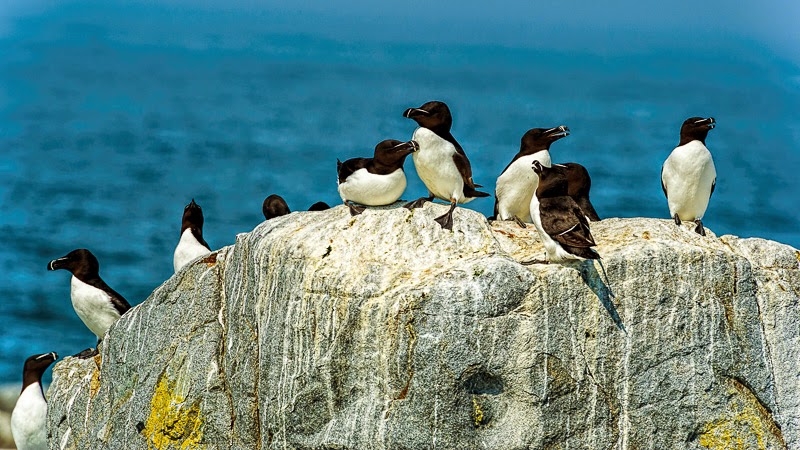
Razorbills On the Rocks at Machias Seal Island
Besides all the Atlantic puffins that are on Machias seal island.  There is also a large colony of razorbills probably numbering up to 4000.  A number of the razorbills were putting on a show or either talking to one another or squabbling.  Since I can't speak razorbill I do not know what they were saying.

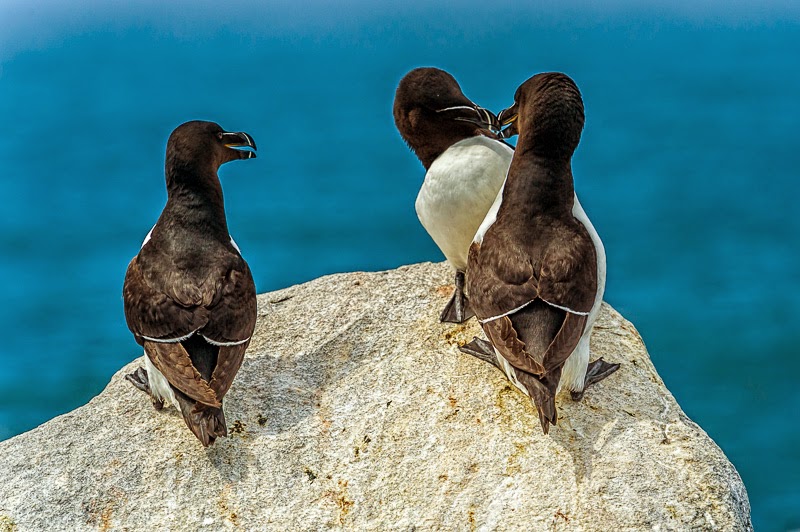
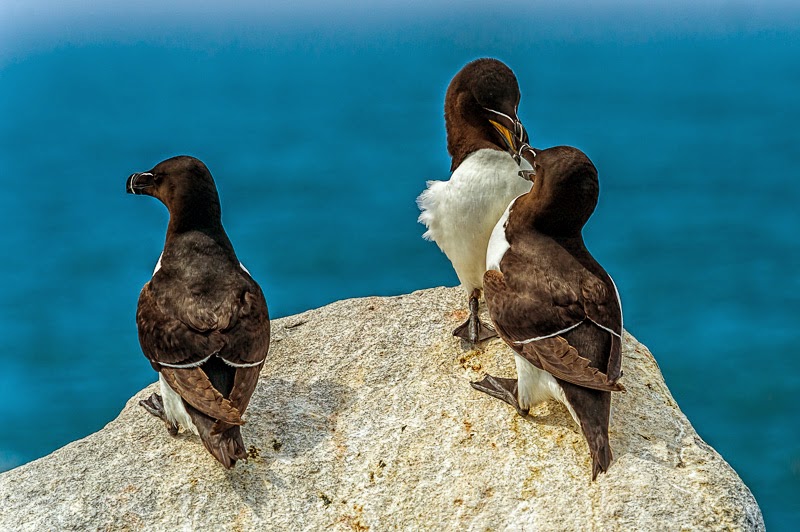
I captured two photographs of one pair of razorbills yakking with another razorbill on the side of them.  The first picture, I like how this third razorbill was looking at the other two razorbills with its mouth open, possibly saying stop it or whatever.  The second picture had the third razorbill, looking away from the other two razorbills, but, the two other razorbills to me had a better pose.

Razorbills, picture number one, I like the way the third bird is looking at the other two birds and has its mouth open
Razorbills, picture number two I like the way the two birds have their mouth open, but don't like the third birds, looking away
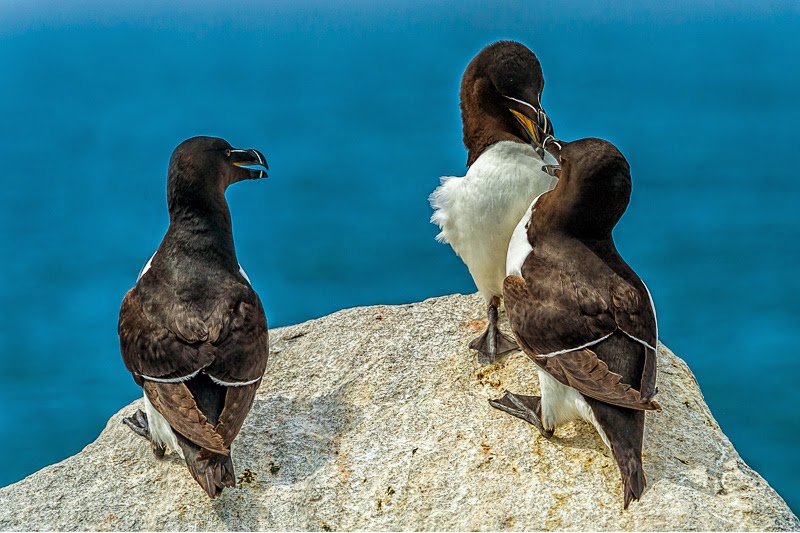
So what to do?  I decided to use Photoshop to see if I could combine both of the pictures into one which expresses my feelings on the scene.  Here's how I did it, I I took the first picture and edited in Lightroom to give me the look I wanted.  Next I utilized Topaz clarity and detail to enhance the picture.  After this, I took the first picture without the Topaz enhancements and in Lightroom synchronized the second picture, then I took the second picture and enhance it also with Topaz clarity and detail settings.  Now the fun begins.  I opened the two images in Photoshop, created a new image with the same dimensions as the original two images.  Under the Windows Menu> Arrange> Float All in Windows.  Then I selected the first of the two images and dragged it onto the new image file, repeated the same action again with the second image.  The layer panel now will contain two new layers, one for each of the original pictures.  Now you select both of the layers and in the Edit Menu , choose Auto-Align Layers and check Reposition Only then click OK.  Click on the top layer and in the layers panel Choose Layer> Layer Mask> Reveal All and add a layer mask to the chosen layer.  Using a black brush.  I painted to reveal the image that I wanted.  When I had the image looking like the way I wanted it to.  I flatten the image and saved it.  Here is the result.
Razorbills, the composite picture, I like this picture because all the birds have their mouth open.


Using the coupon code mborn you will receive a 15% discount on any or all of the Topaz plug-ins.


Help Support my blog by purchasing from Amazon. Clicking on this link and utilizing the link does not cost you anything.
BUY FROM AMAZON

Thursday, July 31, 2014

Keep on Learning

I have been following Jimmy McIntyre on Facebook, and am a subscriber to his weekly email from Shutter Evolve.  Jimmy is a world known landscape photographer and teacher and has many excellent tutorials on improving your photography by utilizing luminosity masks.  In the last issue there were three great video tutorials to help you take and process landscape photos.  The video that I really liked was by Aaron Nace at Phlearn,on  how to make color corrections and contrast adjustments, for cutting through haze, for or windows.  The process requires Photoshop and utilization of curve adjustment layers.  It was not a difficult process to learn and did make a difference in a picture that was taken in very dense fog at Cutler harbor in Maine.  Here are my results.

Cutler harbor unprocessed
Cutler harbor processed
I suggest you watch this video and decide for yourself.  Also, Jimmy McIntyre has on his website a free download of Photoshop PowerPack Actions which includes luminosity, Mass., Orton Effect, Dodge and Burn, Detail Enhancer and Autumn Colors.
Click here to visit Jimmy McIntyre.

Using the coupon code mborn you will receive a 15% discount on any or all of the Topaz plug-ins.


Help Support my blog by purchasing from Amazon. Clicking on this link and utilizing the link does not cost you anything but helps me.
BUY FROM AMAZON

Wednesday, July 9, 2014

Eastern Phoebe Chicks and Post-Processing of a Sunset Picture

Eastern Phoebe Chicks
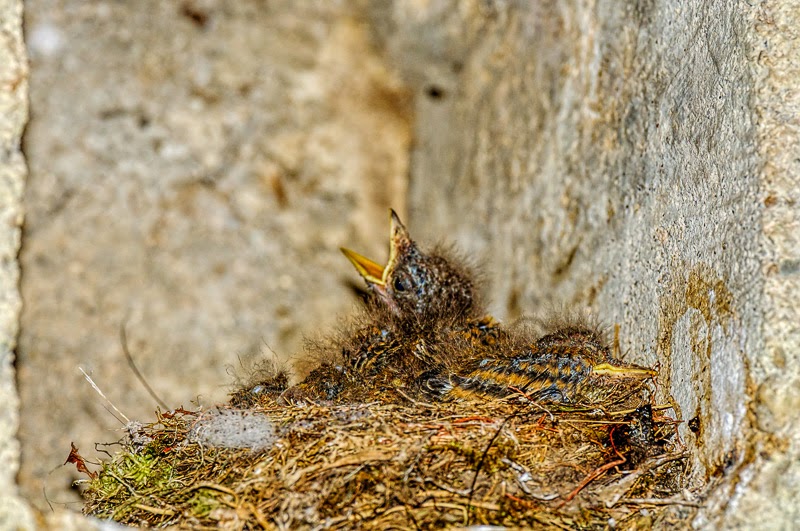
Today, I had to go out to the stone barn to pick up some items and while I was out there I went into the cellar and took some photographs of the Eastern Phoebe chicks.  The nest was located in a cutout in the foundation, which probably in the past had supported a beam.  The nest contained at least two chicks, one which slept the entire time, and the other who raised its head and opened its beak.

 
Eastern Phoebe chicks with one having its beak open

After we came home and downloaded the pictures, my grandson and I took one of his pictures that he took while we were in Bridgewater the other evening and we each post-process the picture.  I am going to post both pictures and they will be labeled number one and number two, and I would appreciate my readers to pick out which one they like and send me an email with the answer and the reason, or enter reply into the blog.  In a later blog out tell you who post process which picture.

Number One
Number Two


Help Support my blog by purchasing from Amazon
BUY FROM AMAZON